Recommendation Explorer
The Recommendation Explorer lets you play the part of a reader. Add the stories they've read, and see what recommendations they'd get. Use it to sanity-check an engine before a placement goes live, or to explain why a reader saw a story. Open it from Content → Recommendation Explorer in the sidebar.
Nothing you do here is saved or affects real readers.
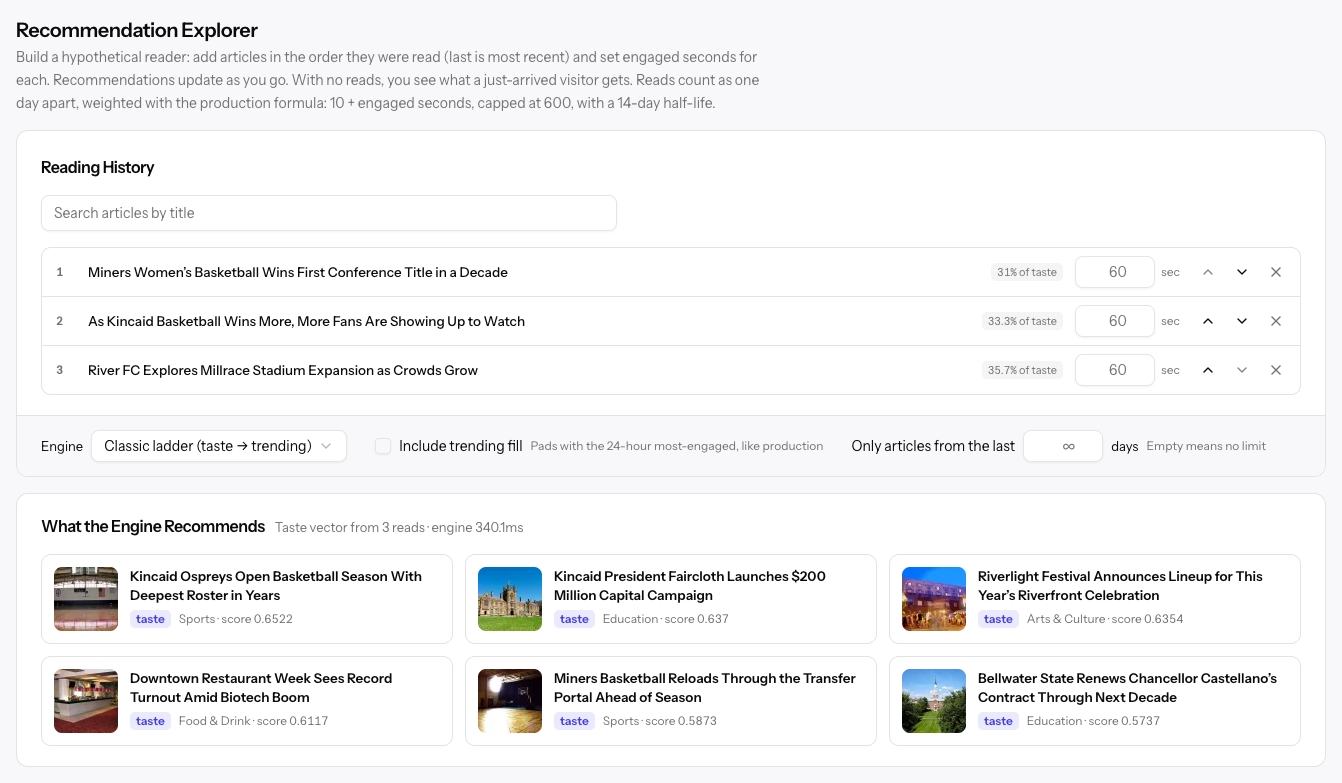
Building a reading history
- Search for a story by title under Reading History and pick it from the list.
- Keep adding stories in the order the reader read them. The last story is the most recent.
- Set the engaged seconds for each read. Longer reads count for more.
Use the arrows to reorder reads and × to remove one. Once results come back, each read shows its share of the reader's taste, so you can see which stories are driving the recommendations.
With no reads, the explorer shows what a reader who just arrived gets, which is usually trending stories.
The explorer weights reads the same way your site does. Reads are treated as one day apart, each read counts for 10 plus its engaged seconds (capped at 600), and a read's influence halves every 14 days.
Choosing an engine
| Setting | What it does |
|---|---|
| Engine | Classic ladder recommends by taste, then falls back to trending. Pick one of your engines to test it instead. Appears once you've created an engine. |
| Include trending fill | With the classic ladder, pads the results with the most-engaged stories of the last 24 hours, as your site does. |
| Only articles from the last | Leaves out stories older than this many days. Empty means no limit. |
Reading the results
What the Engine Recommends shows up to six stories, each with the signal that chose it (taste, similar, trending, category, or geo), its section, and its score. Click a story to open its analytics.
If a read isn't in the catalog yet, a note lists it; it doesn't count toward the reader's taste until it's indexed.
Related
- Recommendation Engines — Create and tune engines
- Content — The catalog of stories