Cohorts
A cohort is a named, reusable set of targeting conditions — the same groups and conditions you build inside a journey, saved on its own so several interactions can reference it. Edit the cohort once and every journey that references it picks up the change immediately.
Cohorts and Segments are different things. A segment is a group of known members defined by their profile — engagement, membership, giving — and built on the Segments page. A cohort is a reusable set of targeting conditions: you build it the same way you build a journey's, and it can match anonymous visitors too.
Creating a Cohort
Open Interactions → Cohorts in the sidebar, then click New Cohort. The list has All, Active, and Archived tabs. A cohort has a name and a set of condition groups.
The Cohort Editor
The cohort editor is the same condition builder used inside a journey, with the same supporting tools:
- Conditions. Build one or more condition groups exactly as in a journey — see Journeys and Targeting Conditions for every attribute, operator, and the All / Any and AND / OR matching rules. A visitor is in the cohort when these conditions match.
- Evaluate. Click Evaluate to define a simulated visitor and see whether they land In this cohort or Not in this cohort. See Testing Journeys for how unset attributes are treated.
- Potential reach. The side panel shows how many visitors the cohort's conditions would match, the same way it does for a journey. See Potential Reach.
- Assistant. Draft or rewrite the cohort's conditions from a plain-language prompt, the same way the Assistant drafts a journey. In the cohort editor it proposes conditions only — it doesn't add actions, and it never proposes referencing another cohort.
- Revisions, undo/redo, and the edit lock all work as they do for an Interaction. See Revisions and Editing Safely.
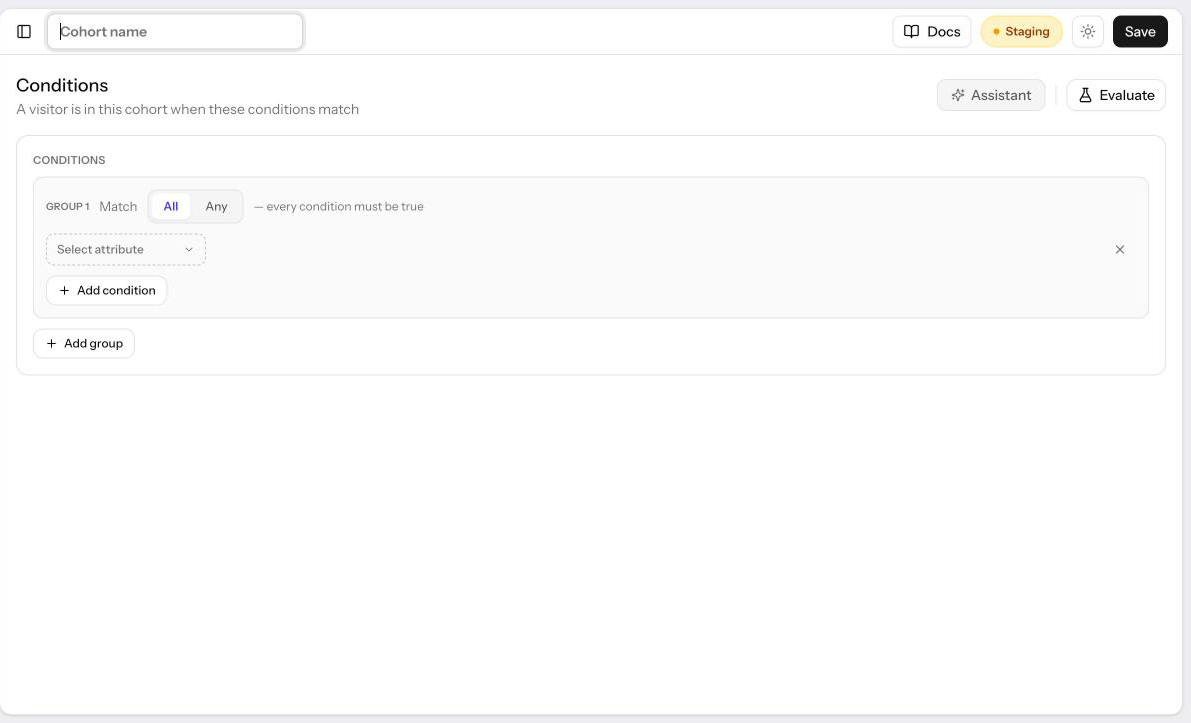
A cohort's own conditions can't reference another cohort — the Cohort attribute doesn't appear in the cohort editor's attribute picker, so cohorts can't nest.
Using a Cohort in a Journey
Inside a journey's condition builder, Cohort is an attribute like any other, listed with Segments in the attribute picker:
| Attribute | Operators | Value |
|---|---|---|
| Cohort | matches any of / matches none of | One or more of your saved cohorts |
Matches any of is true when the visitor matches at least one of the listed cohorts' conditions. Matches none of is true when the visitor matches none of them. Below the cohort field, Edit opens a selected cohort's name and conditions in a drawer, and Create a cohort starts a new one there and selects it once you save. Either way you stay in the interaction, and its unsaved changes are kept. Revisions and reach live on the full cohort editor, which the drawer links to.
If a listed cohort has since been archived, it appears as Deleted cohort and never matches — for either operator. A cohort condition is otherwise subject to the same unknown-value rules as any other attribute: if a condition inside the cohort depends on data Allegro can't resolve for this visitor (for example, a signed-out visitor and a member-profile condition), that part of the cohort simply doesn't match. Allegro then can't say the visitor is outside the cohort either, so Matches none of is false for them too.
Saving Changes Live
There is no draft or publish state for a cohort. Allegro reads a cohort's conditions each time it evaluates a visitor, so as soon as you save, every published interaction in Automatic targeting mode that references the cohort uses the new conditions on the next page view. Draft interactions that reference it pick up whatever the cohort's conditions are when they're published.
When a cohort is referenced by at least one interaction that isn't archived, the save button warns you before you commit: Save — affects N interactions. Archived interactions aren't counted, since they never run. The same warning appears in the revision note dialog, so you have a chance to describe why you changed it before the change takes effect.
Used By and Archiving a Cohort
The Used by card on the cohort's edit page lists every interaction that references it, including archived ones, with a link to each interaction's editor (archived interactions are listed with an Archived badge but not linked, since they have no editor to open).
Archiving a cohort is blocked while any interaction still references it, including an archived one. The error names each interaction that's still using it and marks the archived ones. Remove the Cohort condition from the active interactions' journeys. An archived interaction must first be restored and edited, or permanently deleted. Then archive the cohort.
Restoring an interaction revision that references an archived cohort is refused, and the error names the cohort, so a restore can't bring back a condition that no longer has a cohort behind it.
Potential Reach for Cohorts
Potential reach can estimate a matches any of condition exactly: it expands to the visitors who'd match any of the listed cohorts' conditions, the same way it estimates a group of conditions directly in a journey.
Matches none of can't be estimated. The panel shows Reach isn't counted for "matches none of" cohort conditions, and the condition still evaluates correctly on your site — the panel simply can't count it.
Related
- Journeys — Building the condition groups a cohort shares with a journey
- Targeting Conditions — Every attribute, operator, and value format, including Segments
- Potential Reach — How reach estimates work for a cohort's conditions
- Testing Journeys — Simulating a visitor against a cohort
- Revisions — Version history and rollback, shared by cohorts and interactions