Meters
A meter counts the pages a visitor views over a period of time and compares that count to a limit. Use one to build a metered paywall ("5 free articles a month"), nudge readers as they approach the limit, or show a registration wall after a visitor's third story.
Once a meter exists, journeys can target it and templates can show its numbers, for example "You have 2 free articles left this month."
Creating a Meter
Meters belong to your organization, not to one interaction, so every interaction can target the same meter.
- Open an interaction that uses automatic targeting.
- Click Meters in the Journeys header. The badge shows how many meters you have.
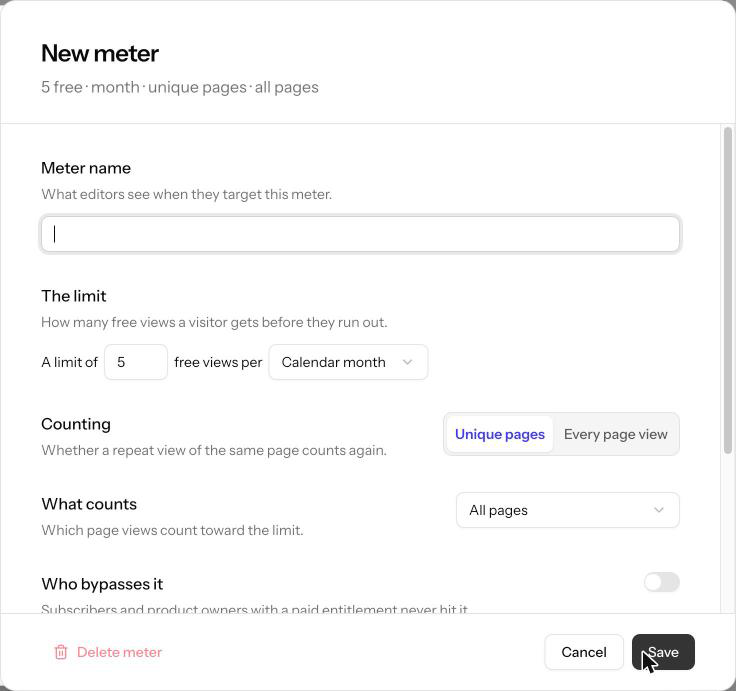
- Click Add meter, fill in the settings below, and click Save.
Manual interactions have no Meters button. To create or edit meters, open any interaction that uses automatic targeting.
| Setting | What it controls |
|---|---|
| Meter name | What editors see when they target the meter. The name also sets the meter's slug, which never changes, even if you rename the meter later. |
| The limit | How many free views a visitor gets, and the period they apply to: Calendar day, Calendar week, Calendar month, Rolling 7 days, Rolling 30 days, Rolling N days, Per session, or Lifetime. |
| Counting | Unique pages counts each page once per period, so rereading an article is free. Every page view counts every load, including repeats. |
| What counts | All pages, or Pages matching… a set of conditions. Click Edit conditions to choose, for example, only pages whose content type is article. |
| Who bypasses it | Visitors who are never metered: anyone with a paid entitlement, members of selected segments, or both. |
| Enabled | Turns the meter off without deleting it. |
Calendar periods start at midnight in your organization's timezone. A rolling period counts the views from the last N days, so the oldest view drops off as each day passes.
What counts can only use conditions about the page and the time, such as URL path, section, or content type. It can't use member data, because the meter counts a visitor before Allegro knows who they are.
Changes That Reset Counts
Changing the limit, the period, the counting mode, or What counts resets every visitor's count to zero, because the old counts no longer mean the same thing. Renaming a meter, turning it on or off, or changing who bypasses it keeps the counts.
How Views Are Counted
Allegro counts a view each time your site loads a page with the Allegro site tag. A signed-in member is counted as the same person on every device. An anonymous visitor is counted per browser.
When a page loads, Allegro checks each enabled meter in this order:
- If the visitor bypasses the meter, it isn't counted and its status is Exempt.
- If the page matches What counts, the view is recorded. With Unique pages, a page the visitor already read this period isn't counted again.
- Journeys are evaluated, so every condition sees the count including this page view.
Targeting a Meter
Each meter adds four attributes to the Meters category of the journey condition picker. They appear as soon as you save the meter.
| Attribute | Operators | Value |
|---|---|---|
| Meter status: name | is, is not, is one of, is not one of | Under limit, Over limit, or Exempt (bypassed) |
| Meter remaining: name | Numeric operators | Free views left in the current period. Never below zero |
| Meter used: name | Numeric operators | Views counted in the current period, including this one. With Unique pages, this counts distinct pages |
| Meter counted this view: name | is true, is false | Whether this page view added one to the count |
"Numeric operators" means =, ≠, >, ≥, <, ≤, between, and is set.
A visitor is Over limit once they have used more views than the limit. A meter with a limit of 5 lets the visitor read five pages. The sixth counted page puts them over the limit.
Meter counted this view is false when the page doesn't match What counts, when a Unique pages meter has already counted the page, and for a visitor who bypasses the meter. Combine it with Over limit to keep pages a reader opened before running out free to reread.
Examples
| Goal | Conditions |
|---|---|
| Show the paywall once the free articles run out | Meter status is Over limit |
| Nudge readers who are close to the limit | Meter status is Under limit and Meter remaining ≤ 2 |
| Ask for a registration after the third article | Meter used ≥ 3 and Authenticated is false |
| Show a "that's one of your free articles" message | Meter counted this view is true and Meter status is Under limit |
| Show the wall on new articles only, so articles read earlier stay open | Meter status is Over limit and Meter counted this view is true |
When a Meter Has No Value
A condition on a meter matches nobody when the meter is turned off or deleted, or when Allegro can't count the visitor. That includes a Per session meter on a site whose tag doesn't send a session. For a visitor who bypasses a meter, Meter remaining and Meter used have no value, so target Meter status is Exempt instead.
Potential Reach can't estimate meter conditions and shows No estimate for them. They still work on your site.
Showing a Meter in a Template
A template can show a visitor's meter numbers with a placeholder that names the meter's slug and a field:
<p>
    You've read {% meter.monthly-articles.used %} of {%
    meter.monthly-articles.limit %} free articles this month.
</p>
Find the slug under Meter name when you open a saved meter. It's the meter's
original name in lowercase with hyphens, for example monthly-articles, and it
stays the same if you rename the meter.
| Placeholder | Shows | Example |
|---|---|---|
{% meter.<slug>.used %} | Views counted in the current period, including this one | 3 |
{% meter.<slug>.limit %} | The meter's limit | 5 |
{% meter.<slug>.remaining %} | Free views left in the current period, never below zero | 2 |
{% meter.<slug>.status %} | under_limit, over_limit, or exempt | under_limit |
{% meter.<slug>.counted %} | true when this page view added one to the count, otherwise false | true |
The same placeholders work in an interaction's field values, so editors can write "Only {% meter.monthly-articles.remaining %} free articles left" into a headline field without changing the template.
Empty Values
A placeholder renders as an empty string, never as null or undefined, when:
- the slug doesn't match any meter, or the meter is turned off or deleted;
- the visitor bypasses the meter (
usedandremainingonly;statusshowsexempt,limitshows the limit, andcountedshowsfalse); - Allegro couldn't count the visitor on this page.
To avoid a sentence with a gap in it, show meter copy only from a journey that targets the meter. For example, show the "2 left" message only when Meter status is Under limit.
status and counted render as plain values such as under_limit or true.
They're most useful in template logic, for example
x-show="'{% meter.monthly-articles.status %}' === 'over_limit'".